Make Your Ideas Come to Life with Visme's Whiteboard Feature

Visme is a fantastic tool that you can use to create dynamic presentations, documents, videos, and more! Did you know that it's free? 

I recently looked at the free Whiteboard feature, which can be used in many ways! For example, you could have your students use the whiteboard feature to brainstorm ideas, create a graphic describing what they learned in class, create a sketch note, or diagram a process. As a teacher, you could use Visme's whiteboard feature to create a presentation, anchor charts, and brainstorm what students know about a topic. 

Check out my example on What is UDL? 

How Does It Work? 

Check out my video crash course for using Visme's Whiteboard feature! 

Conclusion

Why is using Visme essential for your classroom? Brain research shows that our students need different mediums to express and communicate their ideas. Some students may excel at sketching their ideas on paper, others like to write, and some feel more comfortable with a digital tool. It's important to find flexible ways for students to appropriately express what they have learned. Visme could be a great free tool to add to your toolbox of tools to assess student understanding and misconceptions. 

Using Canva's New Translation Tool

 If you are an educator, you have probably used Canva to create amazing presentations, documents, videos, and more! However, did you know Canva has launched a new translation tool to make your documents more accessible to multilingual learners?

  Check out my video on using this tool to help all students access your presentation slides!


CommonLit: Free and Comprehensive Language Arts Literature Program

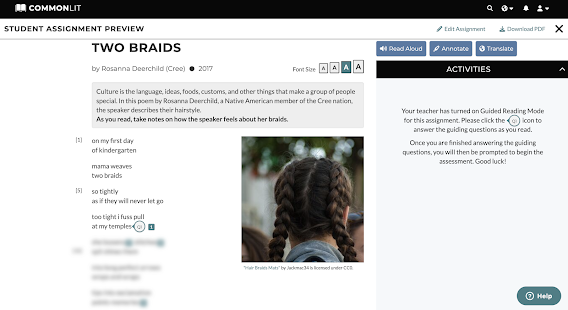
If you are looking for digital resources for language arts instruction, I highly recommend CommonLit. This free tool has an extensive library of digital texts organized by academic standards and Lexile levels. Each text provides students with options for customizing text, such as increasing the font size, translating, annotating, text-to-speech, and solving reading comprehension. 


How Does It Work? 

I created the following video tutorial (5 min) to show you how CommonLit works! 


TEACHFLIX: Crowdsourced Videos for Educators and by Educators

One of my favorite quotes about the power of media is from Canadian philosopher Marshall McLuhan, who said, "the medium is the message." I identify with this quote because I find media a powerful tool for engaging students in the classroom and teachers during professional development. A great video has the potential to generate amazing discussion, increase engagement, and create memorable learning experiences. However, finding the  "right" video is sometimes tricky, right?

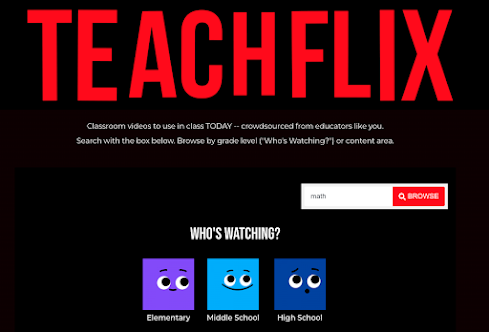
I have spent hours trying to find the "perfect" video to show students and adults; however, I recently found a great teaching resource called TEACHFLIX, which has a curated library of teaching videos and resources for students. You can browse by keyword, subject area, or grade level.

TEACHFLIX explains:

"It’s a collection of videos – sorted into categories – that you can use with your students in class. We’ve found our own favorites – and curated suggestions from classroom teachers. It’s not a perfect, all-encompassing collection. But we like it. And we keep adding new videos to it!" (TEACHFLIX, 2023)

I found TEACHFLIX incredibly useful for teachers at any grade level who want to incorporate video into their classroom. It's easy to use and there are a variety of curated videos, which can save time and effort!


Chat Animator: An Excellent Formative Assessment Alternative

Chat Animator could be an excellent alternative for formative assessments because students can express their understanding through text messaging! When we provide options to recruit student interest, we generate engagement because students are connected to learning in meaningful and relevant ways. Most students use text messaging to connect with their friends and family daily, which makes Chat Animator easy to use and understand.

How Do I Use Chat Animator's Texting Story Maker? 

First, visit the Chat Animator website to create your texting story! 

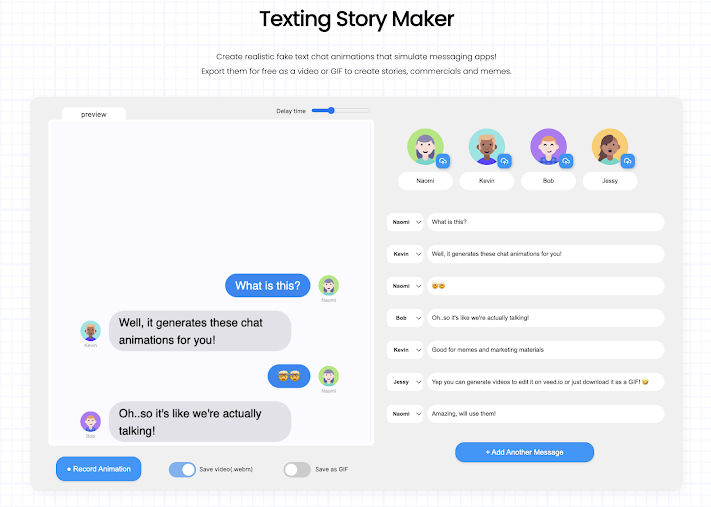
Then, create your conversation! Chat Animator provides you with customized tools for creating a realistic conversation. Change the names of participants, upload profile pictures, and generate a text messaging conversation in the text boxes. 

Finally, you can record and save your animation as a video (.webm) or as a GIF. 

Scenario

Imagine that you have taught a lesson on the properties of triangles. Chat Animator could be used for students to share 3 things they learned about triangles' properties. Check out my sample conversation below! 

BONUS! Make the experience collaborative by having students download their conversation as a GIF and place it in a shared Google Slides presentation or PowerPoint. 


The Fill-in-the-Blank Definition Template

The Fill-in-the-Blank Definitions template is an excellent tool for scaffolding learning and helping multilingual students or all of your students learn new terms. 
The following template uses:

1. Google Docs
2. Dropdown feature in Google Docs

A drop down menu contains a word bank of terms that can be used to help construct the definition of the term. Additionally, students benefit from using visuals to make connections with new vocabulary. Students can insert images from Google or construct their own using Google AutoDraw! 


Check out my video tutorial or access my template here! 


5 Powerful Vocabulary Strategies for All Students

I was recently listening to a presentation about multilingual or ELL learners. The speaker talked about the progression of language development and the importance of vocabulary and student performance. Then they said something so simple yet profound. They said, "we are all language learners."

Sometimes, I need to remember that language is a progression, and we all have to learn new jargon and terminology anytime we learn something new. For instance, a high school biology student and a business education student must learn new vocabulary and jargon to progress through each course. The new teacher must learn the terminology and acronyms within the building. 

All learning begins with vocabulary, but how often do I emphasize vocabulary during instruction? When I try to universally design my classroom, I need to proactively look at learning barriers and honor the variability in my classroom. For instance, why do my students get confused and bored when I teach vocabulary? One reason is that I may not be honoring their background experiences or providing them with tools for making connections. 

Here are five strategies and templates for connecting a student's background knowledge and vocabulary development. 

Idea # 1: Word Stacking

I recently saw an infographic from ImpactPlus Whales that described 4 vocabulary strategies for developing schema. Word Stacking was of my favorite strategies because it could be used with or without technology. 

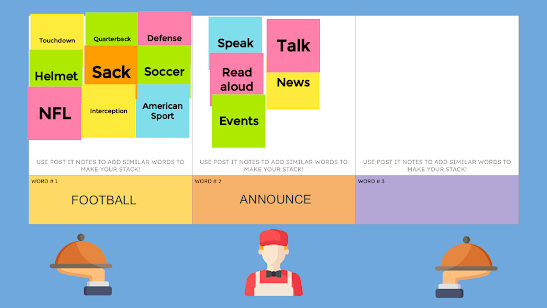
Students begin with a starter word or term. Then they "stack" similar words on top to form the highest stack. The group with the highest stack wins. 

If I were to use this strategy in my classroom, I might offer two different ways for students to participate in this activity. I would offer a low-tech option with post-it notes and perhaps a high-tech option with a tool like Jamboard or Padlet

Here's an example of a Jamboard template I made: 


Would you like the template? Click here!


Idea # 2: Frayer Model 

The Frayer model is one of my favorite tools for building student vocabulary because it provides students multiple ways to represent a term. There are many different variations of the Frayer model; however, I created the following variation to provide students with an opportunity to write, draw, and supply background knowledge. Plus, students can draw their own Frayer model on paper or use an electronic version.


Want the Jamboard template? Click here!


Idea # 3: Find a Route


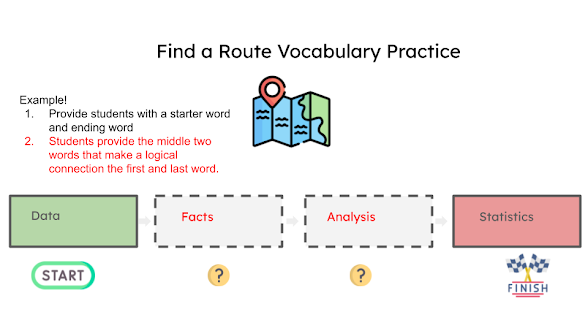
ImpactPlus Whales shared another great strategy called Find a Route! I love it because of the higher order thinking skills it requires students to exercise. Students see a starting word and an ending word that you supply. They must provide two words in the middle of the sequence that make a logical connection between the first and last word. 

This is a great activity that can be done on paper, a dry erase board, or tool like Google Slides or Classkick. Check out my example below in Google Slides: 


Want the Google Slides template? Click here


Idea # 4: Vocabulary Choice Board


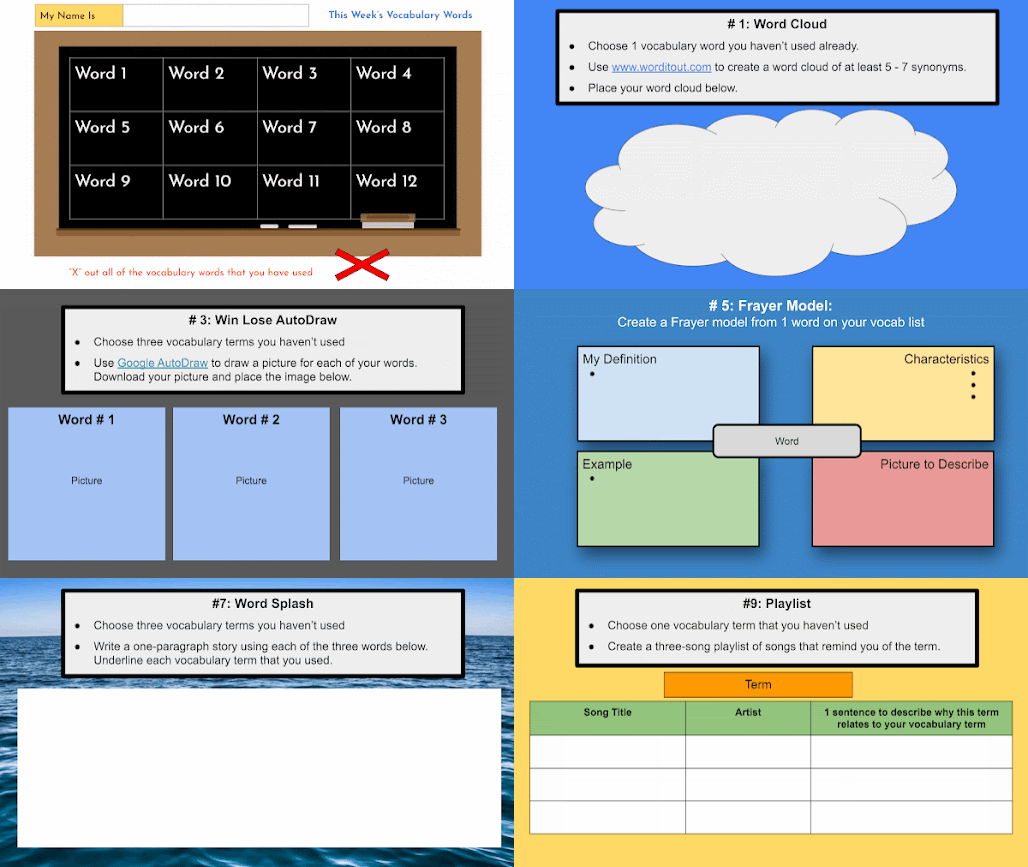
Choice boards are effective tools for creating student engagement. The following Vocabulary Choice Board was developed in Google Slides to provide students with options for demonstrating their understanding. As students complete each task, they will drag the red "X" on top of the task completed. There is an additional slide they can see and mark off vocabulary terms used. 


Want the Google Slides Template? Click here!


Idea # 5: Sketch and Tell Eduprotocol 

The Sketch and Tell strategy developed by Eduprotocols is a great way for students to make connections with vocabulary. Sketching and telling can be used on any device and with almost any application

I developed the following template in Jamboard for students to use different methods to define vocabulary. The bumper sticker template contains two different tasks. First, students need to create a bumper sticker containing the vocabulary term, slogan, and an image or illustration of their term. Much like a Frayer model, this provides students with different ways of sharing the meaning of the word. 

Secondly, the "Tell Us..." section provides students with an opportunity to briefly explain why they chose to do what they did. Reflection is an important aspect of learning because it helps us make deeper connections with learning. 


Want the Jamboard Template? Click here! 


New Learn Lead Grow Home!

Hello readers! Happy New Year! It’s hard to believe that 15 years have passed since I launched my Learn Lead Grow blog. As we step into a n...