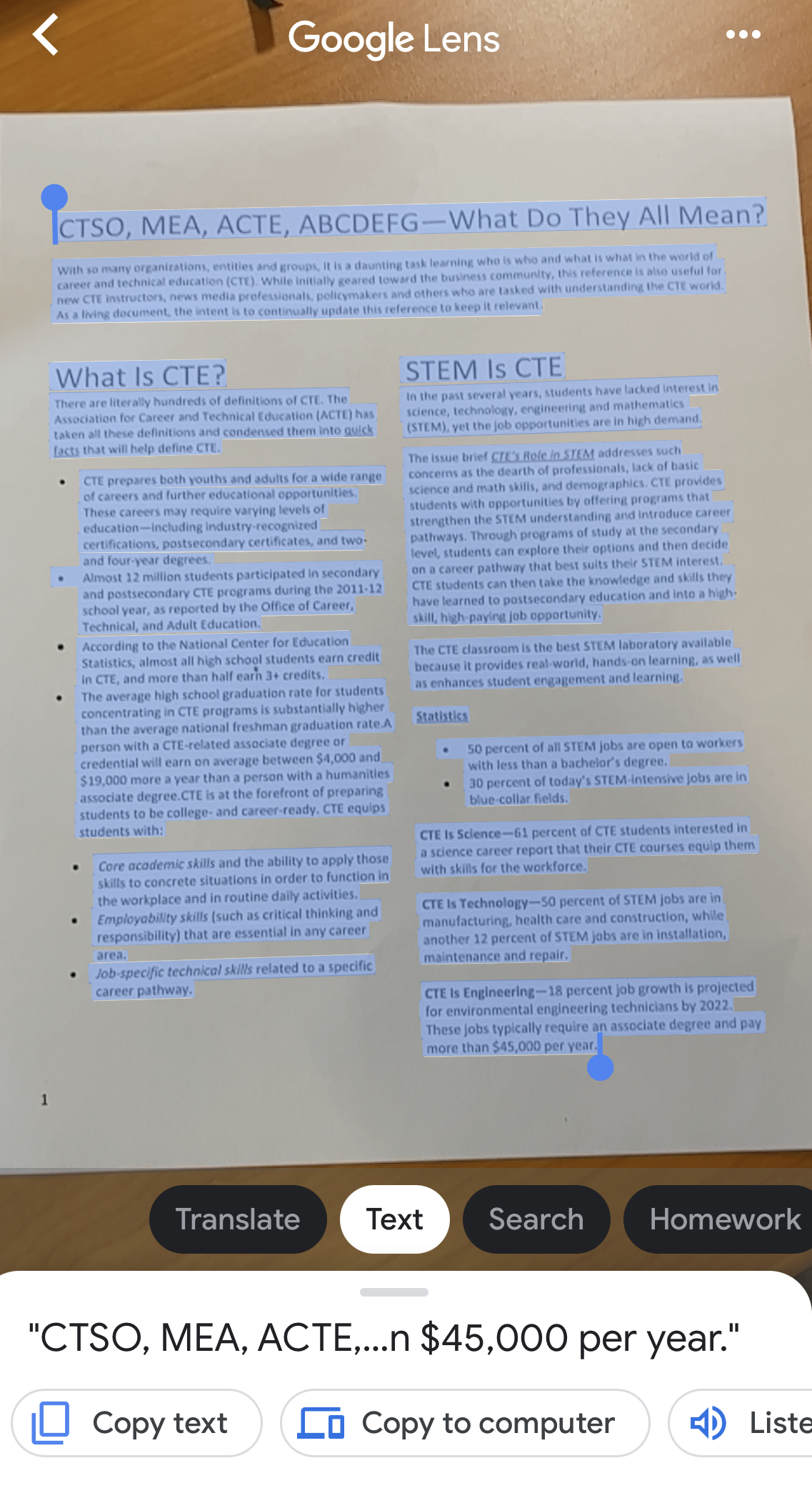
Did you know that you can use the Google Search App on your phone to scan, copy, and even translate a printed text on another device? You can literally scan a printed text from your phone and send it to your laptop with a few taps. This is a game-changer if you want to Universally Design your classroom and make printed text more accessible to ALL students!
Printed Text Limitations
We know that learners differ in how they interact and perceive different media and printed text does have several limitations. First, you are limited in how you can manipulate and interact with printed text. For instance, you cannot change the font size or style. Secondly, hyperlinks to additional resources and tools cannot be embedded in printed documents. Finally, printed text does not have built-in speech-to-text tools.
Educators are sometimes limited by budgets and resources, creating barriers to creating accessible learning environments. This simple trick is free and how students learn in your classroom!
I recently saw an awesome self-paced activity using Google Slides by the Sprinktop Teacher! It was engaging and well designed. As someone constantly thinking about the importance of design and accessibility, I thought..."how could I make this amazing activity even more amazing and accessible for ALL students?"
UDL Makeover: Making An Amazing Activity Even More Amazing and Accessible
Publishing your presentation and providing a QR-code generated from Chrome
Conclusion
When we identify high-probability barriers to accessing learning activities and design with accessible options in mind, we can create highly engaging learning activities for all students. Check out more about the UDL framework and Matt's Lesson Planning with a POP framework below:
Researchers have found that reading fluency is one of the factors that distinguishes good readers from poor readers; however, many of our students and even adults struggle with reading throughout their careers. In fact, according to the US Department of Education, over 70% of the population struggles with some form of reading difficulty.
What if the problem was more than fluency and literacy?
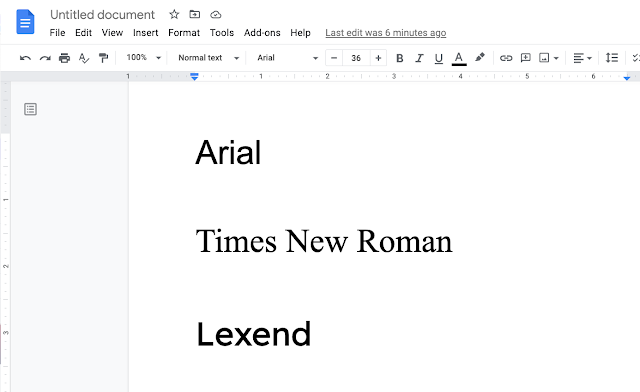
In 2001, Dr. Bonnie Shaver-Troup discovered and designed a new font called Lexend to reduce visual stress and improve reading performance for struggling readers and those with dyslexia.
Shaver-Troup found that the Lexend not only makes reading more for struggling readers and those with dyslexia, it actually benefits ALL readers. Researchers have found some powerful evidence for Lexend:
Reading fluency is calculated to find the correct number of words spoken per minute. Researchers discovered that 90% of readers had better fluency scores with Lexend font than Times New Roman.
Reading fluency performance improved by 19.8% for readers using Lexend versus Times New Roman
Lexend is an example of how design is an important aspect of teaching and learning. We can make reading assignments more accessible for our students by changing the font!
How Can I Use Lexend in Chrome and G Suite?
Check out the following website for Lexend to find out more information.
If you would like to add Lexend to Google Chrome, I recommend checking out the following Chrome Extensions HelperBird and ReaderMode.
Adding Lexend to G Suite (Docs, Slides, Sheets, etc.) is very easy! Check out the following video on how to do it:
Presentations are an important part of the teaching and learning process. There are times when instruction must occur in small or large groups; however, are your presentations accessible to all of your students?
Variability is the rule and not the exception in our classrooms. When you have so many learner differences in one learning environment, you are bound to have learning barriers emerge. How can we make presentations more accessible to students?
Have you ever considered using a chatroom in your classroom? I know it sounds intimidating because chatrooms and backchannel chats have had a reputation for misuse. However, YoTeach! is a teacher and student-friendly website that may change your mind.
Password-protected administrative controls to filter for profanity and moderate conversations before they are posted
Chat and voting mode
Spaceboard - a collaborative whiteboard for students and teachers to use!
Drawboard - an individual board to draw, brainstorm, and add ideas
Hand raising feature for students!
Math doodle board which converts your handwritten content into digital equations!
How might you use this in your classroom?
Take your instruction to the next level and provide students with opportunities to connect, ask questions, and understand instruction in different ways. Here are just a few ideas!
Provide students with a space to ask questions during instruction
Learners are highly variable in the way they learn and interact within learning environments. Unfortunately, not all learning environments and lessons work for our students because many are designed to provide a one-size-fits-all approach to learning. When we teach toward an "average student" (which doesn't exist), we can unintentionally create barriers in the learning environment and learning process.
The Universal Design for Learning (UDL) framework is a research-based method of designing accessible lessons and learning environments for all students. Although students are highly variable, all students need flexible options for:
Representing content
Demonstrating understanding (Action & Expression)
Engagement
Creating access begins with effective design and accessible tools. I recently came across an AMAZING website called Accommodations for All Learners that is dedicated to sharing tools and resources to make learning accessible for all learners.
The website is filled with amazing resources and ideas for designing accessible learning experiences through technology. Here are some of my favorites!
The graphic organizer section is filled with ready-to-use graphic organizers for learning!
Offering choice is an excellent way of creating engagement in the classroom. Simply providing choice is not enough. According to Katz and Assor (2006), the types of choices we offer students are critical. I like to say, "it's not the choice, but the type of choice that matters."
Effective choice should offer (Katz & Assor, 2006):
Autonomy - Do students have opportunities for choice, evaluation, and decision-making?
Competence - Do students have an appropriate amount balance of rigor, relevance, and mastery?
Connectedness - Do students feel a sense of belonging and accomplishment?
Choice shouldn't be a free frawl because too much choice can be paralyzing. The key is offering structured-choice that provides opportunities for students to exercise autonomy, competence, and connectedness. Research suggests that our brains are wired to handle between 2 and 9 choices. In other words, 2 - 9 options are the "sweet spot."
This or That Choice Board
One of my favorite tools for offering structured choice is the This or That Choice Board. Here is a sample Math This or That Choice Board that I created in Google Docs.
The idea is for students to complete four tasks or one in each column. Each column is aligned to a specific skill, concept, or standard. Students have two different ways to demonstrate mastery.
If you are like many teachers, a This or That Choice board can be the perfect solution for classrooms that don't have a lot of flexibility. For instance, you may not have much flexibility with the content, as students may have to solve multi-digit addition and subtraction problems. However, you could provide students with the autonomy to choose one problem or the other.
Another variation to this example is having a problem for students to solve in the first row and an opportunity to create their own word problem on the bottom row. In this example, I provide the answer to a word problem, but students have to develop a solution that makes sense.
This or That Choice Boards are also beneficial for providing students flexibility in the process of learning a new concept. Take, for instance, the following This or That Choice Board on Volume. Students will go through the board to meet the academic standard in their own way.
Conclusion
Remember, it is not the choice but the type of choice that matters most in the classroom. Effective choice provides students with opportunities to exercise autonomy, connectedness, and competence. Although choice is important, staying in the "sweet spot" of 2 to 9 choices is important, making a This or That Choice Boards extremely helpful!
Connectedness - Do students feel a sense of belonging and accomplishment?



%20(Revised%20June%202021)%20(1).png)