Showing posts with label assessment. Show all posts

Gimkit Takes Learning to the Next Level

I'm really starting to like Gimkit! There are so many great tools out there to assess students, like Kahoot and Quizizz; however, Gimkit takes a different spin on assessment.

It provides a gamified approach, where students earn fake money in order to buy and implement certain strategies, such as increasing point values and throwing a monkey wrench into your competition.

Gimkit can be used as a live game (much like Kahoot) or as an assignment (much like NearPod). Plus there are many accessibility features, which makes it easier for students of all abilities and disabilities. Students learn through repetition and at their own pace!

Want a tutorial on how to use it? Check out my crash course below:


Don't Forget About Forms! Create Exit Tickets and Self-Grading Quizzes for Virtual Instruction with Google Forms

Don't forget about Google Forms as a way to assess students for virtual instruction!

Need a refresher on how to create an exit ticket or self-grading quiz? Check this out:


New Grading Feature in Google Forms!

Google Forms is quickly becoming one of my favorite formative assessment tools. In the past, you used to have to limit self-grading questions on Google forms to multiple choice, checklists, and dropdown menus.

Google recently made an update to Forms, which allows users to create self-grading quizzes with short answers. How does it work?

Step 1: Choose the Settings Button (Gear Icon)

Choose the Settings button, select the Quizzes tab, and turn on the Make this a Quiz feature. Make sure that you save your progress!

Step 2: Create Your Question

Create your question on Google Forms. Type in your question and make sure that "Short Answer" is selected.


Step 3: Add Your Correct Answers

While you are still editing your question, select "Answer Key" and enter in all of your possible short answers. You will also want to select the box containing "Mark All Other Answers as Incorrect" and add a point value for your question.


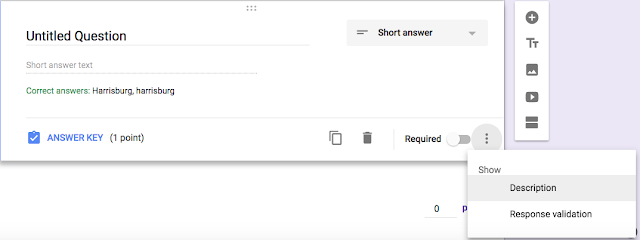
NOTE: If you want students to type text or numbers a certain way, you can use the description and response validation features of Google Forms. Make sure that you are back in the editing feature of your question in order to access this.

  • The description section is useful for writing a helpful hint, such as "Capitalize the first letter!"
  • The response validation feature is useful for restricting responses to a certain type of answer. For example, you may want to limit responses to numbers and whole numbers. 


Gamify Assessment with Quizizz

Recently I posted about Quizalize, which has the entertainment factor of Kahoot with the student paced questioning methods of Socrative. Just like Kahoot, it can be accessed on any device via your browser.

 +Kevin O'Donnell recommended that I take a look at Quizizz, which I instantly liked! This is another assessment tool that can be added into your arsenal of assessment tools. 


Quizizz is an awesome way to help enhance learning, while gamifying your classroom. Why do I like it?

  • Although there is a timer function built in, students can still answer questions at their own pace. 
  • You can play live or as a homework session! 
  • You can jumble up the question order, so that students can't cheat! 
  • You can turn a leader board on or off. One of the biggest disadvantages of Kahoot, is that students care more about how quickly they answer questions (and get points). With Quizizz, you can turn this feature off!
  • It is device agnostic and can be used in any environment. 
  • Fun avatars and memes! When users enter the game, they enter their name and have an avatar is pre-assigned to them. Once you answer a question, a fun meme is there to encourage or congratulate you!
  • Data is saved! You can save data, so that you can make decisions and enter it into your grade book. 

Want to learn more about it? Here are some helpful resources. Do you have other assessment tools that you like? I'd love to hear about them! Please send a comment. 

November is Click's for a Cause Month!

For the past three years, November has been "Clicks for a Cause" month. Every time that you visit my blog during the month of November, I will contribute a penny towards the medical fund of a child in need. Here are past beneficiaries of this project. 

Addison Mae Jacobs was born on January 13, 2015, 4 weeks premature. She was born at only 6 lbs 5 oz and 17.5 inches long.  On October 27, 2015, she was diagnosed with Shwachman-Diamond Syndrome (SDS), a devastating disease impacting only one in a million children. SDS is a rare autosomal recessive disorder characterized by exocrine pancreatic insufficiency, bone marrow dysfunction, leukemia predisposition, and skeletal abnormalities.

Addison is currently being seen by nine different medical specialists and her family is coordinating her care between Penn State Hershey Medical Center and Children's Hospital of Philadelphia. There are many expensive surgeries, tests, and medical costs in her future.  Due to the costly nature of her care, travel expenditures and having to take significant amounts of time off work, her family has setup a GoFundMe account for Addison, as well as a support page to show updates and her progress.

How Can I Help?

I will be donating a penny for every visit to this blog during the month of November. Are you willing to help too?
  • Visit this blog, pray, or spread the word about Addison! 
  •  Become a Courageous giver and make a flat donation or match my donation  at the end of the month to Addison’s GoFundMe page

You've Heard of Kahoot and Socrative, But Do You Quizalize?

There are so many options when it comes to assessing students with technology in the classroom. Some of my favorites are a part of the fabric of almost every classroom I visit:

I have to ask, do you Quizalize? If you aren't, you may want to consider using great way to assess students. It has the entertainment factor of Kahoot with the student paced questioning methods of Socrative. Just like Kahoot, it can be accessed on any device via your browser. 

What I Like:
  • Students can work at their own pace. When they answer a question, they get immediate feedback to help them understand whether they got the answer right or wrong.
  • Want to give a homework assignment? As long as students have the access code, they can take the quiz when it works for them. 
  • Tools like Socrative and Nearpod provide spreadsheets to analyze individual and group performance, but Quizalize analyzes the strengths and weaknesses of students in realtime. A realtime dashboard lets you know who needs a little help and who has mastered the content. 

Do you have other assessment tools that you like? I'd love to hear about them! Please send a comment. 


November is Click's for a Cause Month!

For the past three years, November has been "Clicks for a Cause" month. Every time that you visit my blog during the month of November, I will contribute a penny towards the medical fund of a child in need. Here are past beneficiaries of this project. 

Addison Mae Jacobs was born on January 13, 2015, 4 weeks premature. She was born at only 6 lbs 5 oz and 17.5 inches long.  On October 27, 2015, she was diagnosed with Shwachman-Diamond Syndrome (SDS), a devastating disease impacting only one in a million children. SDS is a rare autosomal recessive disorder characterized by exocrine pancreatic insufficiency, bone marrow dysfunction, leukemia predisposition, and skeletal abnormalities.

Addison is currently being seen by nine different medical specialists and her family is coordinating her care between Penn State Hershey Medical Center and Children's Hospital of Philadelphia. There are many expensive surgeries, tests, and medical costs in her future.  Due to the costly nature of her care, travel expenditures and having to take significant amounts of time off work, her family has setup a GoFundMe account for Addison, as well as a support page to show updates and her progress.

How Can I Help?

I will be donating a penny for every visit to this blog during the month of November. Are you willing to help too?
  • Visit this blog, pray, or spread the word about Addison! 
  •  Become a Courageous giver and make a flat donation or match my donation  at the end of the month to Addison’s GoFundMe page

New Learn Lead Grow Home!

Hello readers! Happy New Year! It’s hard to believe that 15 years have passed since I launched my Learn Lead Grow blog. As we step into a n...